Showing posts with label HBase. Show all posts

Sunday, 19 February 2017

Phoenix Kakfa Integration {Kalyan Contribution to Apache}


Hi All,

Phoenix Kafka is new Integration. You can follow the below link

http://phoenix.apache.org/kafka.html


This is new feature, require now a days .. 

Real time Streaming data pushing into OLTP system like Phoenix.


You can see similar use cases in below links from my blog.

Flume Real Time Projects


Kafka Real Time Projects


How to track the `Production Level of Tracking` for any issues, like below


Please share to you friends & colleagues to know more on these kind of use cases.


Thursday, 6 October 2016

How To Stream JSON Data Into Phoenix Using Apache Flume

Pre-Requisites of Flume Project:

hadoop-2.6.0
flume-1.6.0
hbase-1.1.2
phoenix-4.7.0
java-1.7

NOTE: Make sure that install all the above components


Flume Project Download Links:


`hadoop-2.6.0.tar.gz` ==> link
`apache-flume-1.6.0-bin.tar.gz` ==> link
`hbase-1.1.2-bin.tar.gz` ==> link
`phoenix-4.7.0-HBase-1.1-bin.tar.gz` ==> link
`kalyan-json-phoenix-agent.conf` ==> link
`bigdata-examples-0.0.1-SNAPSHOT-dependency-jars.jar` ==> link
`phoenix-flume-4.7.0-HBase-1.1.jar` ==> link
`json-path-2.2.0.jar` ==> link
`commons-io-2.4.jar` ==> link

-----------------------------------------------------------------------------

1. create "kalyan-json-phoenix-agent.conf" file with below content

agent.sources = EXEC
agent.channels = MemChannel
agent.sinks = PHOENIX

agent.sources.EXEC.type = exec
agent.sources.EXEC.command = tail -F /tmp/users.json
agent.sources.EXEC.channels = MemChannel

agent.sinks.PHOENIX.type = org.apache.phoenix.flume.sink.PhoenixSink
agent.sinks.PHOENIX.batchSize = 10
agent.sinks.PHOENIX.zookeeperQuorum = localhost
agent.sinks.PHOENIX.table = users2
agent.sinks.PHOENIX.ddl = CREATE TABLE IF NOT EXISTS users2 (userid BIGINT NOT NULL, username VARCHAR, password VARCHAR, email VARCHAR, country VARCHAR, state VARCHAR, city VARCHAR, dt VARCHAR NOT NULL CONSTRAINT PK PRIMARY KEY (userid, dt))
agent.sinks.PHOENIX.serializer = json
agent.sinks.PHOENIX.serializer.columnsMapping = {"userid":"userid", "username":"username", "password":"password", "email":"email", "country":"country", "state":"state", "city":"city", "dt":"dt"}
agent.sinks.PHOENIX.serializer.partialSchema = true
agent.sinks.PHOENIX.serializer.columns = userid,username,password,email,country,state,city,dt
agent.sinks.PHOENIX.channel = MemChannel

agent.channels.MemChannel.type = memory
agent.channels.MemChannel.capacity = 1000
agent.channels.MemChannel.transactionCapacity = 100

2. Copy "kalyan-json-phoenix-agent.conf" file into "$FUME_HOME/conf" folder

3. Copy "phoenix-flume-4.7.0-HBase-1.1.jar, json-path-2.2.0.jar, commons-io-2.4.jar and bigdata-examples-0.0.1-SNAPSHOT-dependency-jars.jar" files into"$FLUME_HOME/lib" folder

4. Generate Large Amount of Sample JSON data follow this article.

5. Execute Below Command to Generate Sample JSON data with 100 lines. Increase this number to get more data ...

java -cp $FLUME_HOME/lib/bigdata-examples-0.0.1-SNAPSHOT-dependency-jars.jar \
com.orienit.kalyan.examples.GenerateUsers \
-f /tmp/users.json \
-n 100 \
-s 1


6. Verify the Sample JSON data in Console, using below command

cat /tmp/users.json


7. To work with Flume + Phoenix Integration


Follow the below steps


i. start the hbase using below 'start-hbase.sh' command.


ii. verify the hbase is running or not with "jps" command


iii. Start the phoenix using below 'sqlline.py localhost' command.


iv. list out all the tables in phoenix using '!tables' command


8. Execute the below command to `Extract data from JSON data into Phoenix using Flume`

$FLUME_HOME/bin/flume-ng agent -n agent --conf $FLUME_HOME/conf -f $FLUME_HOME/conf/kalyan-json-phoenix-agent.conf -Dflume.root.logger=DEBUG,console


9. Verify the data in console


10. Verify the data in Phoenix

Execute below command to get the data from phoenix table 'users2'

!tables

select count(*) from users2;

select * from users2;


How To Stream CSV Data Into Phoenix Using Apache Flume

Pre-Requisites of Flume Project:

hadoop-2.6.0
flume-1.6.0
hbase-1.1.2
phoenix-4.7.0
java-1.7

NOTE: Make sure that install all the above components

Flume Project Download Links:

`hadoop-2.6.0.tar.gz` ==> link
`apache-flume-1.6.0-bin.tar.gz` ==> link
`hbase-1.1.2-bin.tar.gz` ==> link
`phoenix-4.7.0-HBase-1.1-bin.tar.gz` ==> link
`kalyan-regex-phoenix-agent.conf` ==> link
`bigdata-examples-0.0.1-SNAPSHOT-dependency-jars.jar` ==> link
`phoenix-flume-4.7.0-HBase-1.1.jar` ==> link
`json-path-2.2.0.jar` ==> link
`commons-io-2.4.jar` ==> link

-----------------------------------------------------------------------------

1. create "kalyan-regex-phoenix-agent.conf" file with below content

agent.sources = EXEC
agent.channels = MemChannel
agent.sinks = PHOENIX

agent.sources.EXEC.type = exec
agent.sources.EXEC.command = tail -F /tmp/users.csv
agent.sources.EXEC.channels = MemChannel

agent.sinks.PHOENIX.type = org.apache.phoenix.flume.sink.PhoenixSink
agent.sinks.PHOENIX.batchSize = 10
agent.sinks.PHOENIX.zookeeperQuorum = localhost
agent.sinks.PHOENIX.table = users1
agent.sinks.PHOENIX.ddl = CREATE TABLE IF NOT EXISTS users1 (userid BIGINT NOT NULL, username VARCHAR, password VARCHAR, email VARCHAR, country VARCHAR, state VARCHAR, city VARCHAR, dt VARCHAR NOT NULL CONSTRAINT PK PRIMARY KEY (userid, dt))
agent.sinks.PHOENIX.serializer = regex
agent.sinks.PHOENIX.serializer.regex = ^([^,]*),([^,]*),([^,]*),([^,]*),([^,]*),([^,]*),([^,]*),([^,]*)$
agent.sinks.PHOENIX.serializer.columns=userid,username,password,email,country,state,city,dt
agent.sinks.PHOENIX.channel = MemChannel

agent.channels.MemChannel.type = memory
agent.channels.MemChannel.capacity = 1000
agent.channels.MemChannel.transactionCapacity = 100

2. Copy "kalyan-regex-phoenix-agent.conf" file into "$FUME_HOME/conf" folder

3. Copy "phoenix-flume-4.7.0-HBase-1.1.jar, json-path-2.2.0.jar, commons-io-2.4.jar and bigdata-examples-0.0.1-SNAPSHOT-dependency-jars.jar" files into"$FLUME_HOME/lib" folder

4. Generate Large Amount of Sample CSV data follow this article.

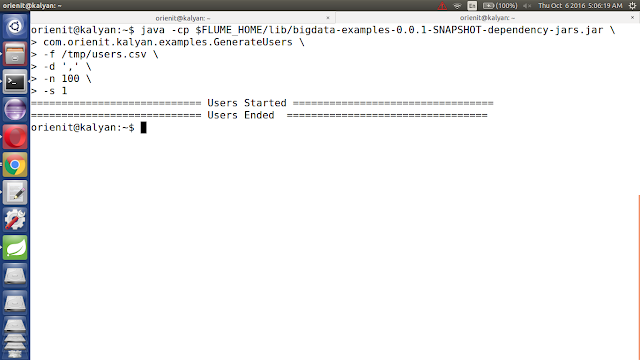
5. Execute Below Command to Generate Sample CSV data with 100 lines. Increase this number to get more data ...

java -cp $FLUME_HOME/lib/bigdata-examples-0.0.1-SNAPSHOT-dependency-jars.jar \
com.orienit.kalyan.examples.GenerateUsers \
-f /tmp/users.csv \
-d ',' \
-n 100 \
-s 1


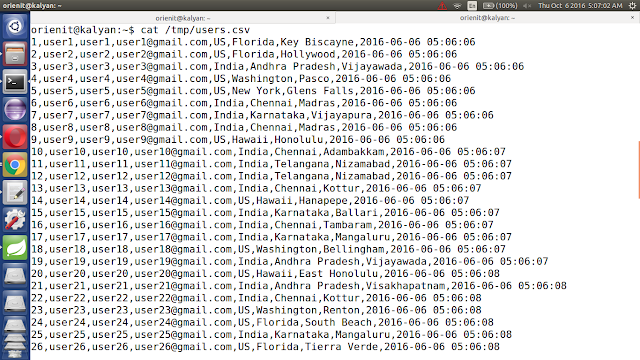
6. Verify the Sample CSV data in Console, using below command

cat /tmp/users.csv


7. To work with Flume + Phoenix Integration

Follow the below steps

i. start the hbase using below 'start-hbase.sh' command.
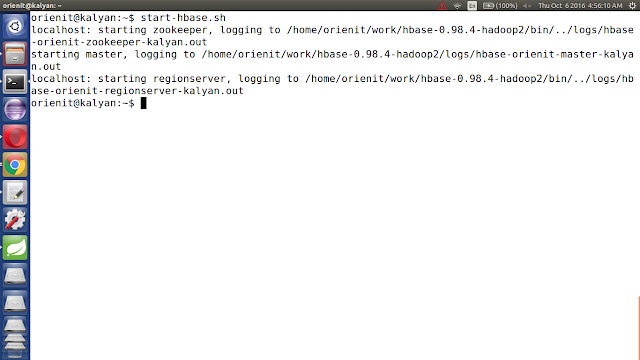


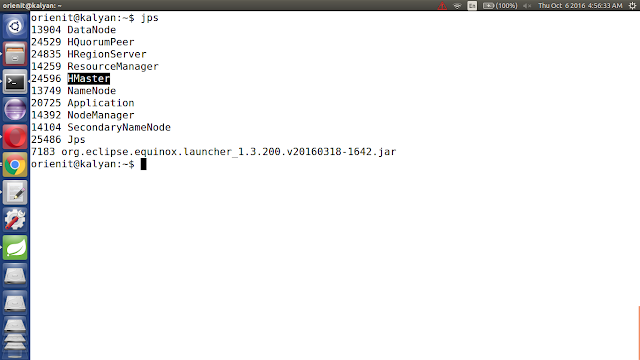
ii. verify the hbase is running or not with "jps" command


iii. Start the phoenix using below 'sqlline.py localhost' command.


iv. list out all the tables in phoenix using '!tables' command


8. Execute the below command to `Extract data from CSV data into Phoenix using Flume`

$FLUME_HOME/bin/flume-ng agent -n agent --conf $FLUME_HOME/conf -f $FLUME_HOME/conf/kalyan-regex-phoenix-agent.conf -Dflume.root.logger=DEBUG,console

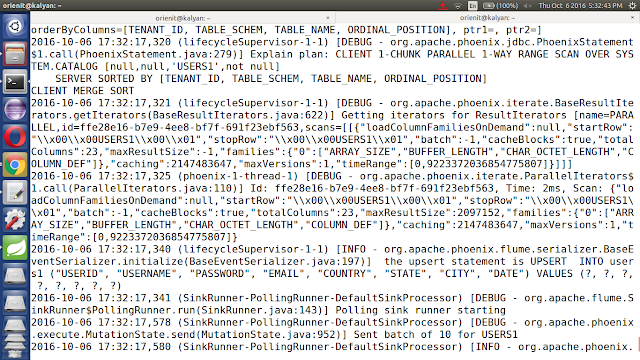
9. Verify the data in console
10. Verify the data in Phoenix

Execute below command to get the data from phoenix table 'users1'

!tables

select count(*) from users1;

select * from users1;


How To Stream Text Data Into HBase Using Apache Flume

Pre-Requisites of Flume Project:
hadoop-2.6.0
flume-1.6.0
hbase-0.98.4
java-1.7

Project Compatibility :
1. hadoop-2.6.0 + hbase-0.98.4 + flume-1.6.0
2. hadoop-2.7.2 + hbase-1.1.2 + flume-1.7.0

NOTE: Make sure that install all the above components


Flume Project Download Links:

`hadoop-2.6.0.tar.gz` ==> link
`apache-flume-1.6.0-bin.tar.gz` ==> link
`kalyan-text-hbase-agent.conf` ==> link
`kalyan-flume-project-0.1.jar` ==> link

-----------------------------------------------------------------------------

1. create "kalyan-text-hbase-agent.conf" file with below content

agent.sources = NETCAT
agent.channels = MemChannel
agent.sinks = HBASE

agent.sources.NETCAT.type = netcat
agent.sources.NETCAT.bind = localhost
agent.sources.NETCAT.port = 3000
agent.sources.NETCAT.channels = MemChannel

agent.sinks.HBASE.type = hbase
agent.sinks.HBASE.table = sample1
agent.sinks.HBASE.columnFamily = cf
agent.sinks.HBASE.serializer = org.apache.flume.sink.hbase.SimpleHbaseEventSerializer
agent.sinks.HBASE.serializer.payloadColumn=message
agent.sinks.HBASE.serializer.incrementColumn=inc
agent.sinks.HBASE.channel = MemChannel

agent.channels.MemChannel.type = memory
agent.channels.MemChannel.capacity = 1000
agent.channels.MemChannel.transactionCapacity = 100


2. Copy "kalyan-text-hbase-agent.conf" file into "$FUME_HOME/conf" folder


3. Copy "kalyan-flume-project-0.1.jar" file into "$FLUME_HOME/lib" folder


4. To work with Flume + HBase Integration

Follow the below steps

i. start the hbase using below 'start-hbase.sh' command.


ii. verify the hbase is running or not with "jps" command


iii. connect to hbase using 'hbase shell' command


iv. list out all the tables in hbase using 'list' command


v. create the hbase table name is 'sample1' with column family name is 'cf' using below command.


create 'sample1', 'cf'


vi. read the data from hbase table 'sample1' using below 
command.

scan 'sample1'


5. Execute the below command to `Extract data from Text data into HBase using Flume`

$FLUME_HOME/bin/flume-ng agent -n agent --conf $FLUME_HOME/conf -f $FLUME_HOME/conf/kalyan-text-hbase-agent.conf -Dflume.root.logger=DEBUG,console


6. Connect to Socket Server using below command

telnet localhost 3000


NOTE: send the sample text to flume like below screen


7. Verify the data in console


8. Verify the data in HBase

Execute below command to get the data from hbase table 'sample1'

count 'sample1'

scan 'sample1'


Wednesday, 5 October 2016

How To Stream JSON Data Into HBase Using Apache Flume

Pre-Requisites of Flume Project:
hadoop-2.6.0
flume-1.6.0
hbase-0.98.4
java-1.7

Project Compatibility :
1. hadoop-2.6.0 + hbase-0.98.4 + flume-1.6.0
2. hadoop-2.7.2 + hbase-1.1.2 + flume-1.7.0

NOTE: Make sure that install all the above components


Flume Project Download Links:

`hadoop-2.6.0.tar.gz` ==> link
`apache-flume-1.6.0-bin.tar.gz` ==> link
`kalyan-json-hbase-agent.conf` ==> link
`kalyan-flume-project-0.1.jar` ==> link
`bigdata-examples-0.0.1-SNAPSHOT-dependency-jars.jar` ==> link

-----------------------------------------------------------------------------

1. create "kalyan-json-hbase-agent.conf" file with below content

agent.sources = EXEC
agent.channels = MemChannel
agent.sinks = HBASE

agent.sources.EXEC.type = exec
agent.sources.EXEC.command = tail -F /tmp/users.json
agent.sources.EXEC.channels = MemChannel

agent.sinks.HBASE.type = hbase
agent.sinks.HBASE.table = users2
agent.sinks.HBASE.columnFamily = cf
agent.sinks.HBASE.serializer = com.orienit.kalyan.flume.sink.JsonHbaseEventSerializer
agent.sinks.HBASE.serializer.colNames=userid,username,password,email,country,state,city,dt
agent.sinks.HBASE.channel = MemChannel

agent.channels.MemChannel.type = memory
agent.channels.MemChannel.capacity = 1000
agent.channels.MemChannel.transactionCapacity = 100


2. Copy "kalyan-json-hbase-agent.conf" file into "$FUME_HOME/conf" folder


3. Copy "kalyan-flume-project-0.1.jar and bigdata-examples-0.0.1-SNAPSHOT-dependency-jars.jar" files into "$FLUME_HOME/lib" folder


4. Generate Large Amount of Sample JSON data follow this article.


5. Execute Below Command to Generate Sample JSON data with 100 lines. Increase this number to get more data ...

java -cp $FLUME_HOME/lib/bigdata-examples-0.0.1-SNAPSHOT-dependency-jars.jar \
com.orienit.kalyan.examples.GenerateUsers \
-f /tmp/users.json \
-n 100 \
-s 1


6. Verify the Sample JSON data in Console, using below command

cat /tmp/users.json


7. To work with Flume + HBase Integration

Follow the below steps


1. start the hbase using below 
command.

start-hbase.sh 


2. verify the hbase is running or not with "jps" command


3. connect to hbase using below command 

hbase shell


4. list out all the tables in hbase using 'list' command


5. create the hbase table name is 'users2' with column family name is 'cf' using below command.

create 'users2', 'cf'


6. read the data from hbase table 'users2' using below command.
scan 'users2'

8. Execute the below command to `Extract data from JSON data into HBase using Flume`

$FLUME_HOME/bin/flume-ng agent -n agent --conf $FLUME_HOME/conf -f $FLUME_HOME/conf/kalyan-json-hbase-agent.conf -Dflume.root.logger=DEBUG,console


9. Verify the data in console


10. Verify the data in HBase

Execute below command to get the data from hbase table 'users2'

count 'users2'

scan 'users2'


How To Stream CSV Data Into HBase Using Apache Flume

Pre-Requisites of Flume Project:
hadoop-2.6.0
flume-1.6.0
hbase-0.98.4
java-1.7

Project Compatibility :
1. hadoop-2.6.0 + hbase-0.98.4 + flume-1.6.0
2. hadoop-2.7.2 + hbase-1.1.2 + flume-1.7.0

NOTE: Make sure that install all the above components


Flume Project Download Links:

`hadoop-2.6.0.tar.gz` ==> link
`apache-flume-1.6.0-bin.tar.gz` ==> link
`kalyan-regex-hbase-agent.conf` ==> link
`kalyan-flume-project-0.1.jar` ==> link
`bigdata-examples-0.0.1-SNAPSHOT-dependency-jars.jar` ==> link

-----------------------------------------------------------------------------

1. create "kalyan-regex-hbase-agent.conf" file with below content

agent.sources = EXEC
agent.channels = MemChannel
agent.sinks = HBASE

agent.sources.EXEC.type = exec
agent.sources.EXEC.command = tail -F /tmp/users.csv
agent.sources.EXEC.channels = MemChannel

agent.sinks.HBASE.type = hbase
agent.sinks.HBASE.table = users1
agent.sinks.HBASE.columnFamily = cf
agent.sinks.HBASE.serializer = org.apache.flume.sink.hbase.RegexHbaseEventSerializer
agent.sinks.HBASE.serializer.regex = ^([^,]*),([^,]*),([^,]*),([^,]*),([^,]*),([^,]*),([^,]*),([^,]*)$
agent.sinks.HBASE.serializer.colNames=userid,username,password,email,country,state,city,dt
agent.sinks.HBASE.channel = MemChannel

agent.channels.MemChannel.type = memory
agent.channels.MemChannel.capacity = 1000
agent.channels.MemChannel.transactionCapacity = 100

2. Copy "kalyan-regex-hbase-agent.conf" file into "$FUME_HOME/conf" folder

3. Copy "kalyan-flume-project-0.1.jar and bigdata-examples-0.0.1-SNAPSHOT-dependency-jars.jar" files into"$FLUME_HOME/lib" folder

4. Generate Large Amount of Sample CSV data follow this article.

5. Execute Below Command to Generate Sample CSV data with 100 lines. Increase this number to get more data ...

java -cp $FLUME_HOME/lib/bigdata-examples-0.0.1-SNAPSHOT-dependency-jars.jar \
com.orienit.kalyan.examples.GenerateUsers \
-f /tmp/users.csv \
-d ',' \
-n 100 \
-s 1


6. Verify the Sample CSV data in Console, using below command

cat /tmp/users.csv


7. To work with Flume + HBase Integration

Follow the below steps
1. start the hbase using below 'start-hbase.sh' command.


2. verify the hbase is running or not with "jps" command


3. connect to hbase using 'hbase shell' command


4. list out all the tables in hbase using 'list' command


5. create the hbase table name is 'users1' with column family name is 'cf' using below create 'users1', 'cf' command.


6. read the data from hbase table 'users1' using below scan 'users1' command.


8. Execute the below command to `Extract data from CSV data into HBase using Flume`

$FLUME_HOME/bin/flume-ng agent -n agent --conf $FLUME_HOME/conf -f $FLUME_HOME/conf/kalyan-regex-hbase-agent.conf -Dflume.root.logger=DEBUG,console


9. Verify the data in console


10. Verify the data in HBase

Execute below command to get the data from hbase table 'users1'

count 'users1'

scan 'users1'


Related Posts Plugin for WordPress, Blogger...