Wednesday, 26 October 2016

Twitter Data Sentiment Analysis Using Hive

Pre-Requisites of Twitter Data + Hive + Sentiment Analysis Project:
hadoop-2.6.0
hive-1.2.1
java-1.7

NOTE: Make sure that install all the above components

Twitter Data + Hive + Sentiment Analysis Project Download Links:
`hadoop-2.6.0.tar.gz` ==> link
`apache-hive-1.2.1-src.tar.gz` ==> link
`sentimentanalysis-hive.jar` ==> link
`tweets` ==> link

-----------------------------------------------------------------------------

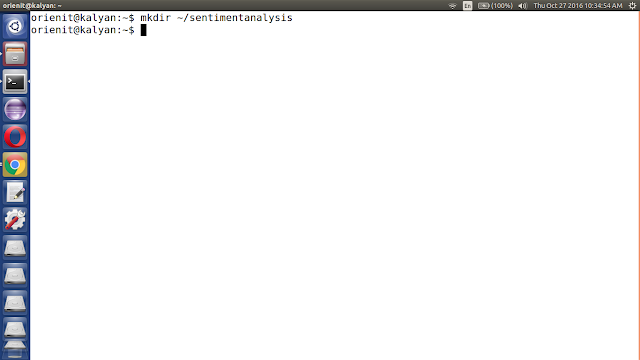
1. Create `sentimentanalysis` folder in your machine

command: mkdir ~/sentimentanalysis


2. Download sample tweets or Download twitter data using flume to do Sentiment Analysis and copy to '~/sentimentanalysis' folder

Note: Download sample tweets link
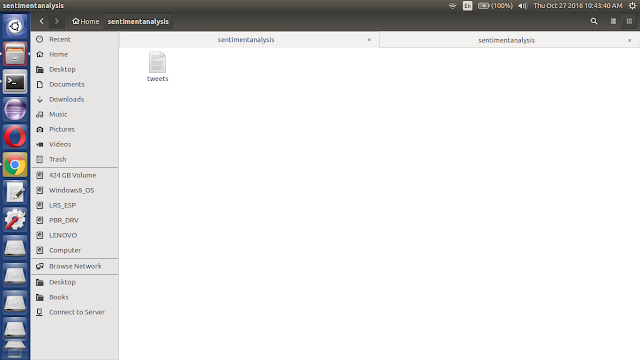


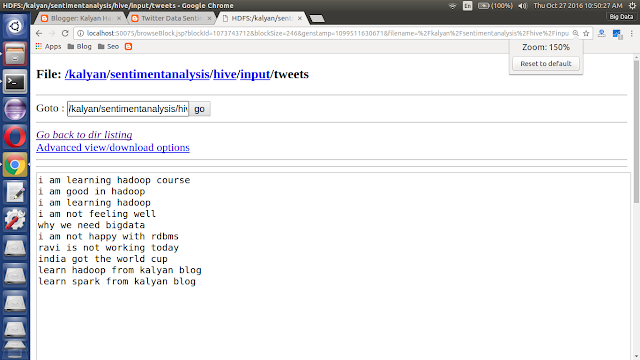
Example: Sample Tweets

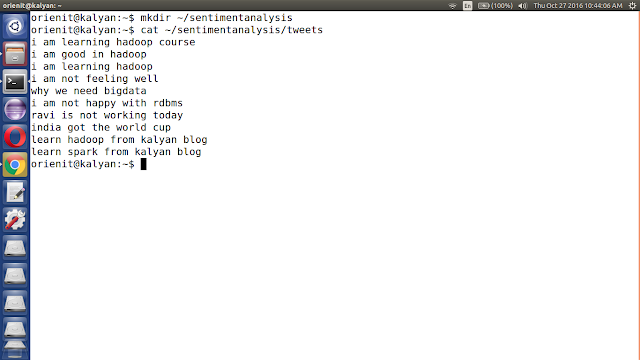
i am learning hadoop course
i am good in hadoop
i am learning hadoop
i am not feeling well
why we need bigdata
i am not happy with rdbms
ravi is not working today
india got the world cup
learn hadoop from kalyan blog
learn spark from kalyan blog


3. verify using cat command

command: cat ~/sentimentanalysis/tweets


4. start the hadoop using below command

command: start-all.sh
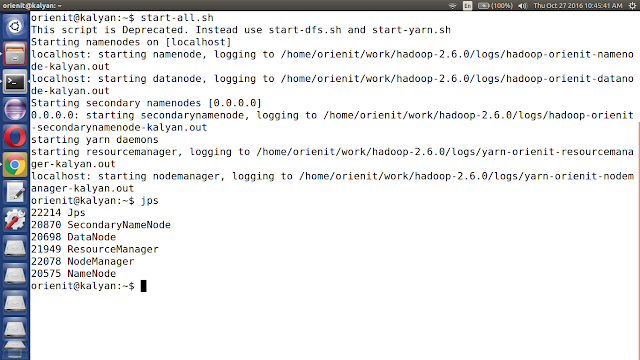


5. verify is running or not using "jps" command


6. Open browser using below url

http://localhost:50070/dfshealth.jsp
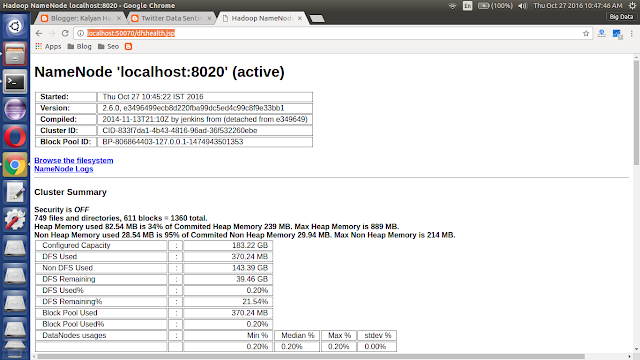


7. Load the sample tweets into HDFS

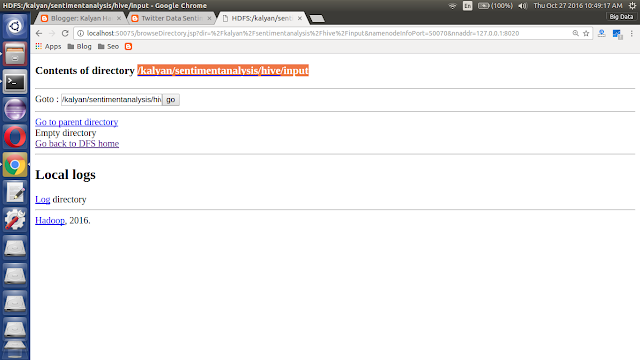
hadoop fs -mkdir -p /kalyan/sentimentanalysis/hive/input
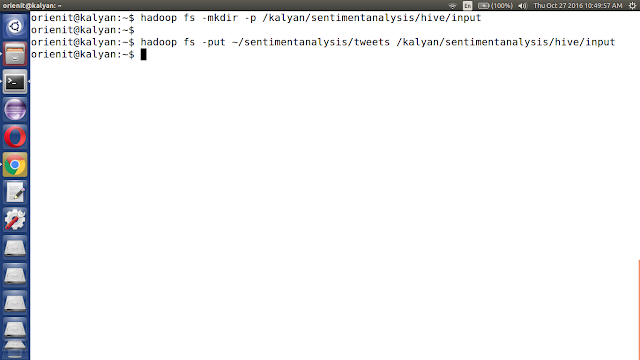


hadoop fs -put ~/sentimentanalysis/tweets /kalyan/sentimentanalysis/hive/input
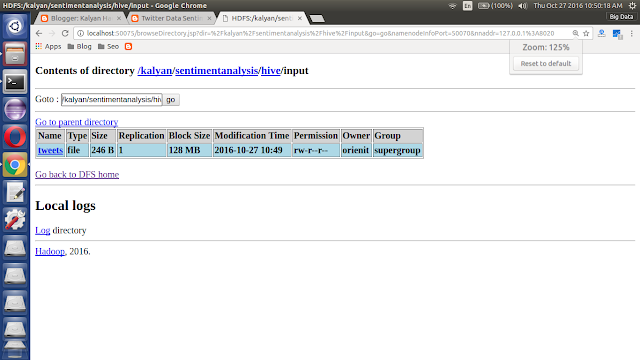


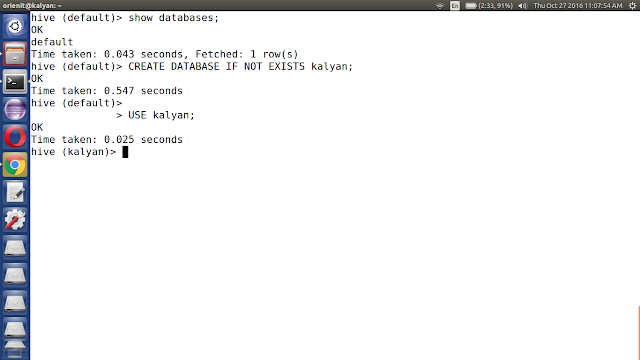
8. Create kalyan database in hive using below command

CREATE DATABASE IF NOT EXISTS kalyan;

USE kalyan;


9. Create tweets table in hive with sample tweets

CREATE EXTERNAL TABLE IF NOT EXISTS kalyan.tweets (tweet string) LOCATION '/kalyan/sentimentanalysis/hive/input';
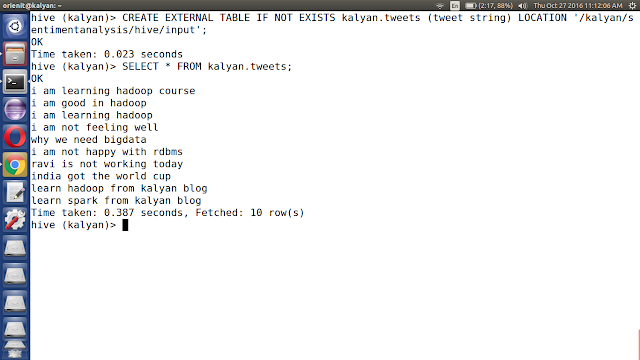


10. Display the tweets table data in hive using select query

SELECT * FROM kalyan.tweets;


11. Download `sentimentanalysis-hive.jar` file and copy to '~/sentimentanalysis' folder

Note: Download sentimentanalysis-hive.jar link
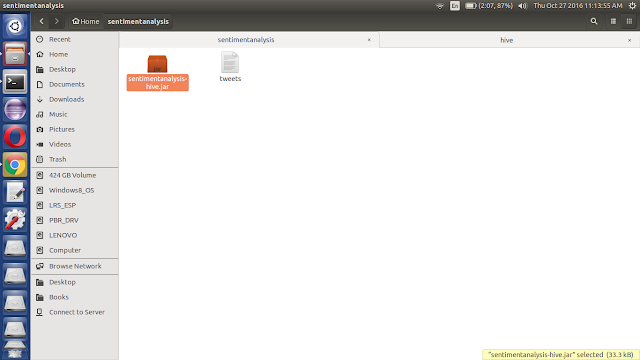


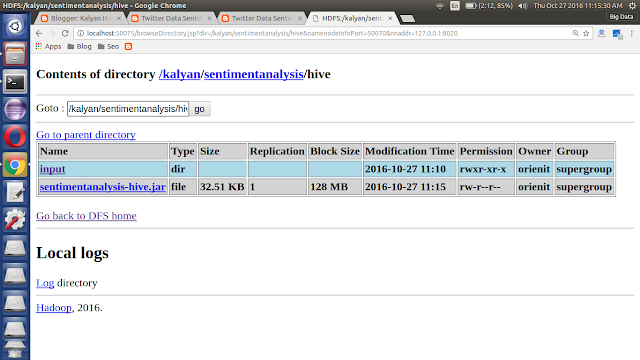
12. Load the `sentimentanalysis-hive.jar` into HDFS

hadoop fs -put ~/sentimentanalysis/sentimentanalysis-hive.jar /kalyan/sentimentanalysis/hive
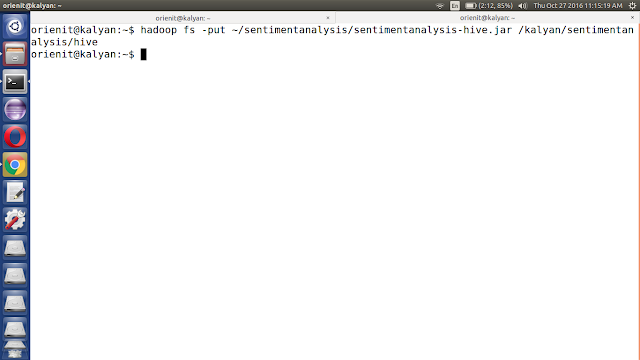


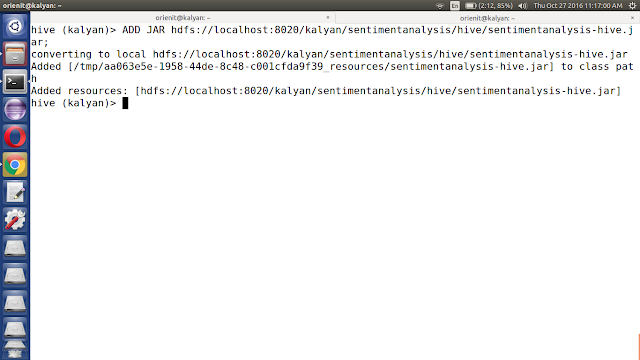
13. Add jar file into hive class path using below command

ADD JAR <PATH OF THE JAR FILE>;

ADD JAR hdfs://localhost:8020/kalyan/sentimentanalysis/hive/sentimentanalysis-hive.jar;


14. Define the sentiment function in hive

Hive supports Temporary function and Permanent function:

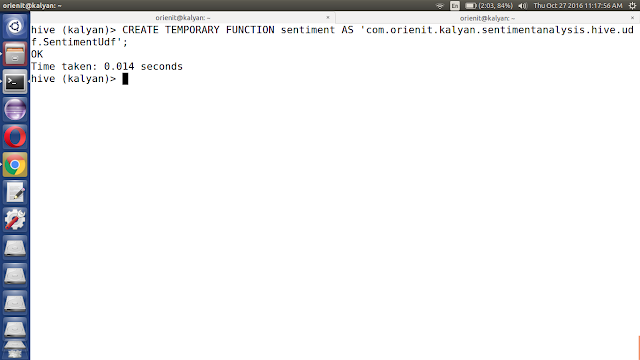
i. Create Temporary function using below command

CREATE TEMPORARY FUNCTION <function name> AS 'UDF CLASS NAME WITH PACKAGE';

CREATE TEMPORARY FUNCTION sentiment AS 'com.orienit.kalyan.sentimentanalysis.hive.udf.SentimentUdf';


ii. Create Permanent function using below command

CREATE FUNCTION <db name>.<function name> AS 'UDF CLASS NAME WITH PACKAGE' USING JAR '<PATH OF THE JAR FILE>';

CREATE FUNCTION kalyan.sentiment AS 'com.orienit.kalyan.sentimentanalysis.hive.udf.SentimentUdf' USING JAR 'hdfs://localhost:8020/kalyan/sentimentanalysis/hive/sentimentanalysis-hive.jar';


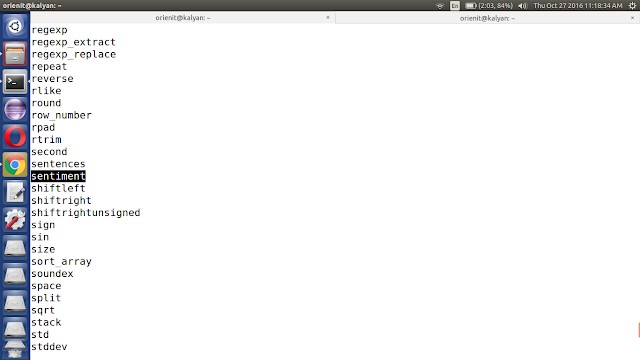
15. Verify the function in hive using below command

SHOW FUNCTIONS;


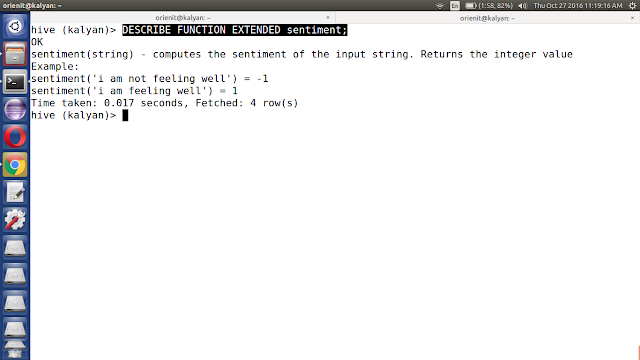
16. Describe the function in hive using below command

DESCRIBE FUNCTION EXTENDED <function name>;

DESCRIBE FUNCTION EXTENDED sentiment;


DESCRIBE FUNCTION EXTENDED kalyan.sentiment;


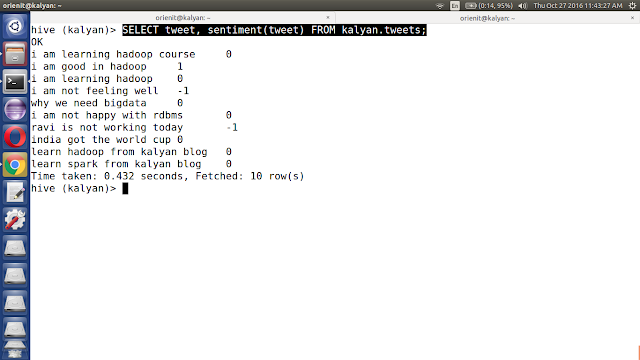
17. Analyse the tweets using sentiment function using below commands

SELECT tweet, sentiment(tweet) FROM kalyan.tweets;


18. Create 'sentimenttweets' table in hive using below command


CREATE TABLE IF NOT EXISTS kalyan.sentimenttweets (tweet string, sentiment int) LOCATION '/kalyan/sentimentanalysis/hive/output';
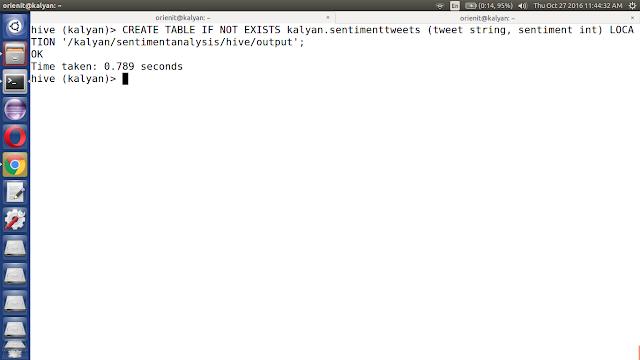


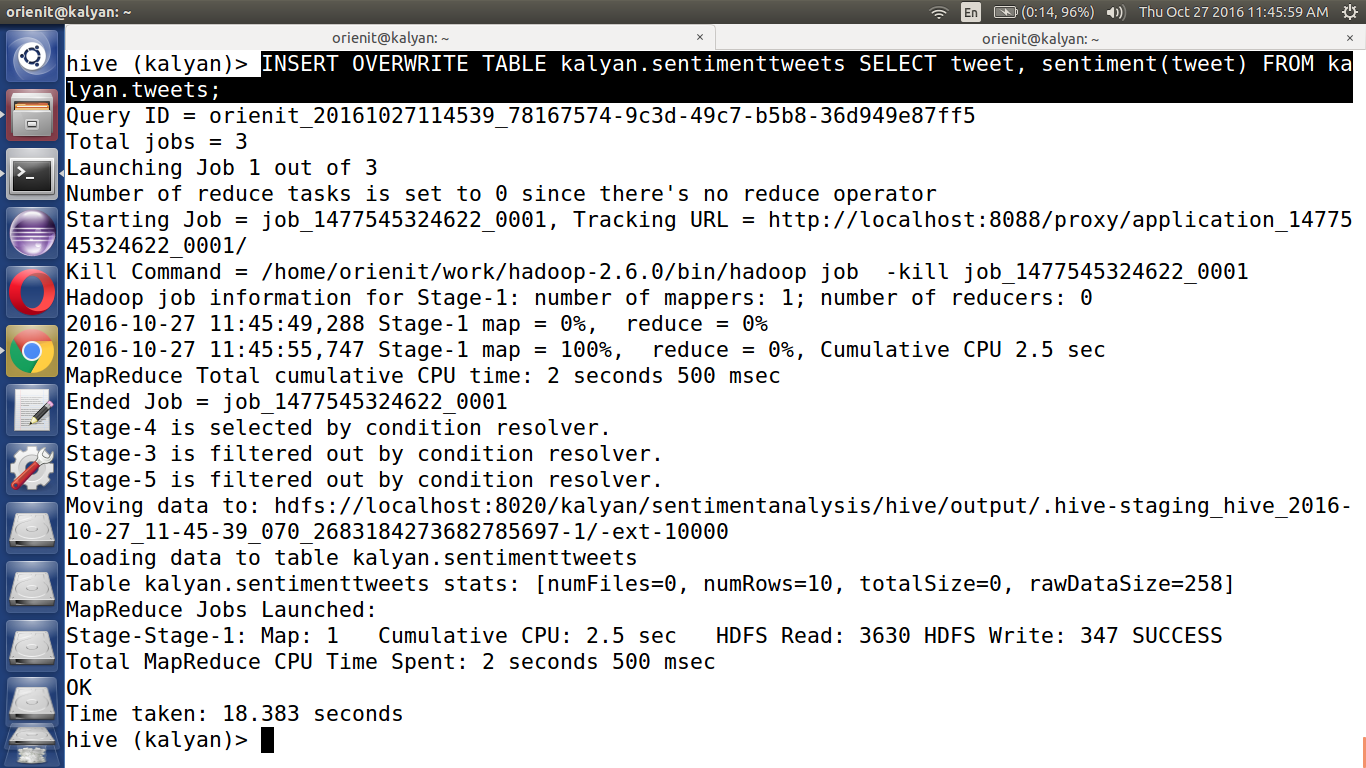
19. Insert Sentiment tweets data into `
sentimenttweets` table

INSERT OVERWRITE TABLE kalyan.sentimenttweets SELECT tweet, sentiment(tweet) FROM kalyan.tweets;
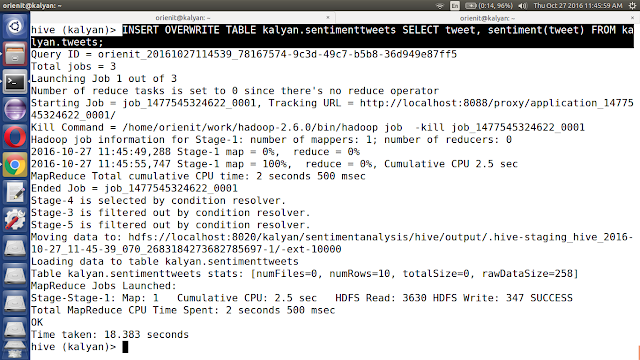


20. Retrieve sentiment tweets data from `sentimenttweets` table

SELECT tweet, sentiment FROM kalyan.sentimenttweets;
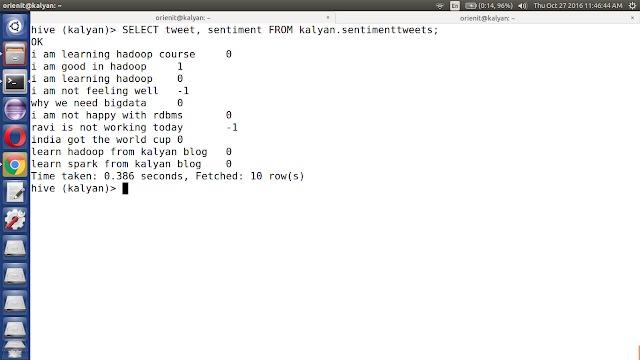


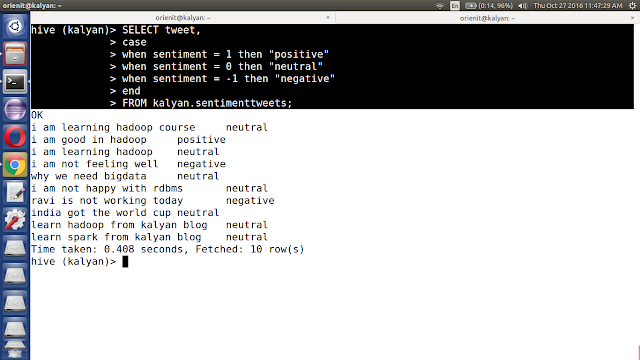
21. Retrieve sentiment tweets data from `sentimenttweets` table using case statement

SELECT tweet,
case
when sentiment = 1 then "positive"
when sentiment = 0 then "neutral"
when sentiment = -1 then "negative"
end
FROM kalyan.sentimenttweets;


Monday, 24 October 2016

SCALA BASICS DAY 2 Practice on 25 Oct 2016

Scala Day 2 Practice:
==============================================


-----------------------------------------------------
Functions in Scala:
------------------------------------------------------
1. anonymous functions
2. named functions
3. curried functions

( x : Int ) =>  { x + 1 }

val add = ( x : Int ) : Int =>  { x + 1 }

add(1)

add(10)

-----------------------------------------------------

scala> val add = ( x : Int ) =>  { x + 1 }
add: Int => Int = <function1>

scala> ( x : Int ) =>  { x + 1 }
res2: Int => Int = <function1>

scala> add(1)
res3: Int = 2

scala> add(10)
res4: Int = 11

-----------------------------------------------------

def add( x : Int ) = { x + 1 }

def add( x : Int ) : Int = { x + 1 }

scala> def add( x : Int ) = { x + 1 }
add: (x: Int)Int

scala> def add( x : Int ) : Int = { x + 1 }
add: (x: Int)Int

scala> add(1)
res5: Int = 2

scala> add(10)
res6: Int = 11

-----------------------------------------------------

val id = 1

if( id == 1) {
  println("condtion match")
} else {
 println("condtion doesn't match")
}

def validate(id : Int) = {
if( id == 1) {
  println("condtion match")
} else {
 println("condtion doesn't match")
}
}

validate(id)


scala> def validate(id : Int) = {
     | if( id == 1) {
     |   println("condtion match")
     | } else {
     |  println("condtion doesn't match")
     | }
     | }
validate: (id: Int)Unit

scala> validate(id)
condtion match

scala> val id = 2
id: Int = 2

scala> validate(id)
condtion doesn't match


-----------------------------------------------------

def factorial( n : Int ) : Int = {
 if ( n == 1 ) 1
 else n * factorial( n - 1 )
}

scala> def factorial( n : Int ) : Int = {
     |  if ( n == 1 ) 1
     |  else n * factorial( n - 1 )
     | }
factorial: (n: Int)Int

scala> factorial(1)
res14: Int = 1

scala> factorial(5)
res15: Int = 120

scala> factorial(6)
res16: Int = 720

-----------------------------------------------------

scala> 1 to 5
res17: scala.collection.immutable.Range.Inclusive = Range(1, 2, 3, 4, 5)

scala> 1 to 5 by 2
res18: scala.collection.immutable.Range = Range(1, 3, 5)

scala> 1 to 5 by 3
res19: scala.collection.immutable.Range = Range(1, 4)

scala> 1 until 5
res20: scala.collection.immutable.Range = Range(1, 2, 3, 4)

scala> 1 until 5 by 2
res21: scala.collection.immutable.Range = Range(1, 3)


-----------------------------------------------------
Scala Collections:
-------------------
1. scala.collection.immutable
2. scala.collection.mutable

var arr1 = Array(1,2,3,4,5)
var arr1 = Array[Int](1,2,3,4,5)

var arr2 = Array("anil", "venkat", "raj", "anvith", "rohith")
var arr2 = Array[String]("anil", "venkat", "raj", "anvith", "rohith")


var list1 = List("anil", "venkat", "raj", "anvith", "rohith")
var list1 = List[String]("anil", "venkat", "raj", "anvith", "rohith")

var set1 = Set("anil", "venkat", "raj", "anvith", "rohith")
var set1 = Set[String]("anil", "venkat", "raj", "anvith", "rohith")


var seq1 = Seq("anil", "venkat", "raj", "anvith", "rohith")
var seq1 = Seq[String]("anil", "venkat", "raj", "anvith", "rohith")

var vec1 = Vector("anil", "venkat", "raj", "anvith", "rohith")
var vec1 = Vector[String]("anil", "venkat", "raj", "anvith", "rohith")


val any1 = List(1, 2.5, true, "anil")
val any1 = List[Any](1, 2.5, true, "anil")

-----------------------------------------------------

scala> var arr1 = Array(1,2,3,4,5)
arr1: Array[Int] = Array(1, 2, 3, 4, 5)

scala> var arr1 = Array[Int](1,2,3,4,5)
arr1: Array[Int] = Array(1, 2, 3, 4, 5)

scala> var arr2 = Array("anil", "venkat", "raj", "anvith", "rohith")
arr2: Array[String] = Array(anil, venkat, raj, anvith, rohith)

scala> var arr2 = Array[String]("anil", "venkat", "raj", "anvith", "rohith")
arr2: Array[String] = Array(anil, venkat, raj, anvith, rohith)

scala> var list1 = List("anil", "venkat", "raj", "anvith", "rohith")
list1: List[String] = List(anil, venkat, raj, anvith, rohith)

scala> var set1 = Set("anil", "venkat", "raj", "anvith", "rohith")
set1: scala.collection.immutable.Set[String] = Set(raj, anvith, rohith, venkat, anil)

scala> val any1 = List(1, 2.5, true, "anil")
any1: List[Any] = List(1, 2.5, true, anil)


-----------------------------------------------------

scala> list1.foreach(println)
anil
venkat
raj
anvith
rohith

scala> any1.foreach(println)
1
2.5
true
anil


scala> list1.foreach(println)
anil
venkat
raj
anvith
rohith

scala> list1.foreach(x => println(x))
anil
venkat
raj
anvith
rohith

scala> list1.foreach((x : String) => { println(x) })
anil
venkat
raj
anvith
rohith


scala> for(x <- list1) println(x)
anil
venkat
raj
anvith
rohith


scala> for(x <- 1 to 6) println(x)
1
2
3
4
5
6

scala> for(x <- 1 to 6 by 2) println(x)
1
3
5


scala> for(x <- 1 to 6) { if( x % 2 == 0 ) println(x) }
2
4
6

scala> for(x <- 1 to 6 if x % 2 == 0) println(x)
2
4
6


scala> val op = for(x <- 1 to 6 if x % 2 == 0) yield x
op: scala.collection.immutable.IndexedSeq[Int] = Vector(2, 4, 6)

scala> op.foreach(println)
2
4
6


-----------------------------------------------------

def factorial( n : Int ) : Int =  {
 var res = 1
 for ( x <- 1 to n )  res = res * x
 res
}


factorial(1)

factorial(5)


scala> def factorial( n : Int ) : Int =  {
     |  var res = 1
     |  for ( x <- 1 to n )  res = res * x
     |  res
     | }
factorial: (n: Int)Int

scala> factorial(1)
res34: Int = 1

scala> factorial(5)
res35: Int = 120

-----------------------------------------------------
curried functions:
------------------------------------------------------
def add( x : Int, y : Int ) : Int  = { x + y }

add(1,2)

def add( x : Int )( y : Int ) : Int  = { x + y }

add(1)(2)


def addOne(y : Int) = add(1)(y)
def addTwo(y : Int) = add(2)(y)

-----------------------------------------------------

scala> def add( x : Int, y : Int ) : Int  = { x + y }
add: (x: Int, y: Int)Int

scala> add(1,2)
res36: Int = 3

scala> def add( x : Int )( y : Int ) : Int  = { x + y }
add: (x: Int)(y: Int)Int

scala> add(1)(2)
res37: Int = 3


scala> def addOne(y : Int) = add(1)(y)
addOne: (y: Int)Int

scala> def addTwo(y : Int) = add(2)(y)
addTwo: (y: Int)Int

scala> addOne(5)
res38: Int = 6

scala> addTwo(5)
res39: Int = 7


-----------------------------------------------------


SCALA BASICS DAY 1 Practice on 24 Oct 2016

Scala Day 1 Practice:
==============================================
orienit@kalyan:~$ scala
Welcome to Scala version 2.11.7 (OpenJDK 64-Bit Server VM, Java 1.8.0_66-internal).
Type in expressions to have them evaluated.
Type :help for more information.

scala> 


scala> val id = 1
id: Int = 1

scala> val id : Int = 1
id: Int = 1

scala> val id : Long = 1
id: Long = 1

scala> val id = 1l
id: Long = 1

scala> val id = 1d
id: Double = 1.0

scala> val id = 1f
id: Float = 1.0

scala> val id : Float = 1
id: Float = 1.0

scala> val id : Double = 1
id: Double = 1.0

-------------------------------------------------

scala> val id = 1
id: Int = 1

scala> id = 2
<console>:11: error: reassignment to val
       id = 2
          ^

scala> var id = 1
id: Int = 1

scala> id = 2
id: Int = 2

-------------------------------------------------

Note: 
1. In scala we don't have any Primitive data types like java
2. In scala every thing is `Object`
3. Operator overloading is avialble in Scala, C++ , but not in Java

-------------------------------------------------

scala> 1
res0: Int = 1

scala> "kalyan"
res1: String = kalyan


scala> 1 + 1
res2: Int = 2

scala> 1.+(1)
res3: Int = 2

scala> 1 + 20.0
res4: Double = 21.0

scala> 1.+(20.0)
res5: Double = 21.0

scala> 10 - 5
res6: Int = 5

scala> 10.-(5)
res7: Int = 5


-------------------------------------------------

scala> val id = 1
id: Int = 1

scala> id.
%   -    >>             isInstanceOf   toFloat   toString   |   
&   /    >>>            toByte         toInt     unary_+        
*   >    ^              toChar         toLong    unary_-        
+   >=   asInstanceOf   toDouble       toShort   unary_~  


-------------------------------------------------

scala> val name = "kalyan"
name: String = kalyan

scala> name.
+                     endsWith             replace        
asInstanceOf          equalsIgnoreCase     replaceAll     
charAt                getBytes             replaceFirst   
chars                 getChars             split          
codePointAt           indexOf              startsWith     
codePointBefore       intern               subSequence    
codePointCount        isEmpty              substring      
codePoints            isInstanceOf         toCharArray    
compareTo             lastIndexOf          toLowerCase    
compareToIgnoreCase   length               toString       
concat                matches              toUpperCase    
contains              offsetByCodePoints   trim           
contentEquals         regionMatches                       

-------------------------------------------------

scala> val id = 1
id: Int = 1

scala> id.toByte
res8: Byte = 1

scala> id.toChar
res9: Char = ?

scala> id.toLong
res10: Long = 1

scala> id.toDouble
res11: Double = 1.0

scala> id.toFloat
res12: Float = 1.0

scala> id.toString
res13: String = 1


-------------------------------------------------
String Interpolation
-------------------------------------------------
val name = "kalyan"
val course = "hadoop"
val location = "hyderabad"
val pincode = 500032
val count = 100


scala> val name = "kalyan"
name: String = kalyan

scala> val course = "hadoop"
course: String = hadoop

scala> val location = "hyderabad"
location: String = hyderabad

scala> val pincode = 500032
pincode: Int = 500032

scala> val count = 100
count: Int = 100


scala> println("Name is " + name + ", Course is " + course)
Name is kalyan, Course is hadoop

scala> println("Name is $name, Course is $course")
Name is $name, Course is $course

scala> println(s"Name is $name, Course is $course")
Name is kalyan, Course is hadoop


scala> println(s"Name is $name, Count is $count")
Name is kalyan, Count is 100

scala> println(f"Name is $name, Count is $count")
Name is kalyan, Count is 100

scala> println(f"Name is $name, Count is $count%.2f")
Name is kalyan, Count is 100.00

scala> println(f"Name is $name, Count is $count%.5f")
Name is kalyan, Count is 100.00000

scala> println(s"Name is $name, Count is $count%.5f")
Name is kalyan, Count is 100%.5f


scala> println(s"Name is $name\nCourse is $course")
Name is kalyan
Course is hadoop

scala> println(raw"Name is $name\nCourse is $course")
Name is kalyan\nCourse is hadoop

-------------------------------------------------
Java:
----------
String[] names = new String[10];

String[] names = {"anil", "raj", "venkat"};


Scala:
----------
val names = new Array[String](10)

val names = Array[String]("anil", "raj", "venkat")

val names = Array("anil", "raj", "venkat")


scala> val names = new Array[String](10)
names: Array[String] = Array(null, null, null, null, null, null, null, null, null, null)

scala> val names = Array[String]("anil", "raj", "venkat")
names: Array[String] = Array(anil, raj, venkat)

scala> val names = Array("anil", "raj", "venkat")
names: Array[String] = Array(anil, raj, venkat)

scala> names(0)
res25: String = anil

scala> names(1)
res26: String = raj

scala> names[1]
<console>:1: error: identifier expected but integer literal found.
names[1]
      ^

-------------------------------------------------


Sunday, 23 October 2016

Learn more on Scala Types : Formatting Numbers and Currency : Day 4 Learnings

Formatting Numbers and Currency

You want to format numbers or currency to control decimal places and commas, typically for printed output.

For basic number formatting, use the f string interpolator , “Sub‐
stituting Variables into Strings”:

scala> val pi = scala.math.Pi
pi: Double = 3.141592653589793

scala> println(f"$pi%1.5f")
3.14159


A few more examples demonstrate the technique:
scala> f"$pi%1.5f"
res0: String = 3.14159

scala> f"$pi%1.2f"
res1: String = 3.14

scala> f"$pi%06.2f"

res2: String = 003.14


If you’re using a version of Scala prior to 2.10, or prefer the explicit use of the format method, you can write the code like this instead:
scala> "%06.2f".format(pi)
res3: String = 003.14


A simple way to add commas is to use the getIntegerInstance method of the java.text.NumberFormat class:

scala> val formatter = java.text.NumberFormat.getIntegerInstance
formatter: java.text.NumberFormat = java.text.DecimalFormat@674dc

scala> formatter.format(10000)
res0: String = 10,000

scala> formatter.format(1000000)
res1: String = 1,000,000


You can also set a locale with the getIntegerInstance method:

scala> val locale = new java.util.Locale("de", "DE")
locale: java.util.Locale = de_DE

scala> val formatter = java.text.NumberFormat.getIntegerInstance(locale)
formatter: java.text.NumberFormat = java.text.DecimalFormat@674dc

scala> formatter.format(1000000)

res2: String = 1.000.000


You can handle floating-point values with a formatter returned by getInstance :

scala> val formatter = java.text.NumberFormat.getInstance
formatter: java.text.NumberFormat = java.text.DecimalFormat@674dc

scala> formatter.format(10000.33)
res0: String = 10,000.33


For currency output, use the getCurrencyInstance formatter:

scala> val formatter = java.text.NumberFormat.getCurrencyInstance
formatter: java.text.NumberFormat = java.text.DecimalFormat@67500

scala> println(formatter.format(123.456789))

$123.46

scala> println(formatter.format(1234.56789))
$1,234.57

scala> println(formatter.format(12345.6789))
$12,345.68

scala> println(formatter.format(123456.789))

$123,456.79


This approach handles international currency:

scala> import java.util.{Currency, Locale}
import java.util.{Currency, Locale}

scala> val de = Currency.getInstance(new Locale("de", "DE"))
de: java.util.Currency = EUR

scala> formatter.setCurrency(de)
scala> println(formatter.format(123456.789))

EUR123,456.79


Note: This recipe falls back to the Java approach for printing currency and other formatted numeric fields, though of course the currency solution depends on how you handle currency in your applications. In my work as a consultant, I’ve seen most companies
handle currency using the Java BigDecimal class, and others create their own custom currency classes, which are typically wrappers around BigDecimal

Learn more on Scala Types : Creating a Range, List, or Array of Numbers : Day 4 Learnings

Creating a Range, List, or Array of Numbers

You need to create a range, list, or array of numbers, such as in a for loop, or for testing purposes.

Use the to method of the Int class to create a Range with the desired elements:
scala> val r = 1 to 10
r: scala.collection.immutable.Range.Inclusive = Range(1, 2, 3, 4, 5,
6, 7, 8, 9, 10)


You can set the step with the by method:
scala> val r = 1 to 10 by 2
r: scala.collection.immutable.Range = Range(1, 3, 5, 7, 9)

scala> val r = 1 to 10 by 3
r: scala.collection.immutable.Range = Range(1, 4, 7, 10)

Ranges are commonly used in for loops:
scala> for (i <- 1 to 5) println(i)
1
2

3
4
5

When creating a Range , you can also use until instead of to :
scala> for (i <- 1 until 5) println(i)
1
2
3

4


Scala makes it easy to create a range of numbers. The first three examples shown in the Solution create a Range . 

You can easily convert a Range to other sequences, such as an Array or List , like this:

scala> val x = 1 to 10 toArray
x: Array[Int] = Array(1, 2, 3, 4, 5, 6, 7, 8, 9, 10)

scala> val x = 1 to 10 toList
x: List[Int] = List(1, 2, 3, 4, 5, 6, 7, 8, 9, 10)


Although this infix notation syntax is clear in many situations (such as for loops), it’s generally preferable to use this syntax:

scala> val x = (1 to 10).toList
x: List[Int] = List(1, 2, 3, 4, 5, 6, 7, 8, 9, 10)

scala> val x = (1 to 10).toArray
x: Array[Int] = Array(1, 2, 3, 4, 5, 6, 7, 8, 9, 10)

The magic that makes this process work is the to and until methods, which you’ll find in the RichInt class. 

When you type the following portion of the code, you’re actually invoking the to method of the RichInt class:  
1 to

You can demonstrate that to is a method on an Int by using this syntax in the REPL:

1.to(10)


You can create a random-length range, which can be useful for testing:
scala> var range = 0 to scala.util.Random.nextInt(10)
range: scala.collection.immutable.Range.Inclusive = Range(0, 1, 2, 3)


By using a range with the for / yield construct, you don’t have to limit your ranges to sequential numbers:
scala> for (i <- 1 to 5) yield i * 2
res0: scala.collection.immutable.IndexedSeq[Int] = Vector(2, 4, 6, 8, 10)


You also don’t have to limit your ranges to just integers:
scala> for (i <- 1 to 5) yield i.toDouble
res1: scala.collection.immutable.IndexedSeq[Double] =

Vector(1.0, 2.0, 3.0, 4.0, 5.0)

Learn more on Scala Types : Generating Random Numbers : Day 3 Learnings

Generating Random Numbers

You need to create random numbers, such as when testing an application, performing a simulation, and many other situations.

Create random numbers with the Scala scala.util.Random class. You can create random integers:
scala> val r = scala.util.Random
r: scala.util.Random = scala.util.Random@13eb41e5

scala> r.nextInt
res0: Int = −1323477914


You can limit the random numbers to a maximum value:
scala> r.nextInt(100)
res1: Int = 58

In this use, the Int returned is between 0 (inclusive) and the value you specify (exclusive), so specifying 100 returns an Int from 0 to 99 .


You can also create random Float values:
// returns a value between 0.0 and 1.0
scala> r.nextFloat
res2: Float = 0.50317204

You can create random Double values:
// returns a value between 0.0 and 1.0
scala> r.nextDouble
res3: Double = 0.6946000981900997


You can set the seed value using an Int or Long when creating the Random object:
scala> val r = new scala.util.Random(100)
r: scala.util.Random = scala.util.Random@bbf4061


You can also set the seed value after a Random object has been created:
r.setSeed(1000L)


The Random class handles all the usual use cases, including creating numbers, setting the maximum value of a random number range, and setting a seed value. You can also generate random characters:

// random characters

scala> r.nextPrintableChar
res0: Char = H

scala> r.nextPrintableChar
res1: Char = r


Scala makes it easy to create a random-length range of numbers, which is especially useful for testing:

// create a random length range
scala> var range = 0 to r.nextInt(10)
range: scala.collection.immutable.Range.Inclusive = Range(0, 1, 2, 3)

scala> range = 0 to r.nextInt(10)
range: scala.collection.immutable.Range.Inclusive = Range(0, 1)


You can add a for / yield loop to modify the numbers:

scala> for (i <- 0 to r.nextInt(10)) yield i * 2

res0: scala.collection.immutable.IndexedSeq[Int] = Vector(0, 2, 4)

You can easily create random-length ranges of other types. Here’s a random-length collection of up to 10 Float values:

scala> for (i <- 0 to r.nextInt(10)) yield (i * r.nextFloat)
res1: scala.collection.immutable.IndexedSeq[Float] =
Vector(0.0, 0.71370363, 1.0783684)


Here’s a random-length collection of “printable characters”:

scala> for (i <- 0 to r.nextInt(10)) yield r.nextPrintableChar
res2: scala.collection.immutable.IndexedSeq[Char] = Vector(x, K, ^, z, w)

Be careful with the nextPrintableChar method. A better approach may be to control the characters you use, as shown in my “How to create a list of alpha or alphanumeric characters” article, shown in the See Also.

Conversely, you can create a sequence of known length, filled with random numbers:

scala> for (i <- 1 to 5) yield r.nextInt(100)

res3: scala.collection.immutable.IndexedSeq[Int] = Vector(88, 94, 58, 96, 82)


Learn more on Scala Types : Handling Very Large Numbers : Day 3 Learnings

Handling Very Large Numbers

You’re writing an application and need to use very large integer or decimal numbers.


Use the Scala BigInt and BigDecimal classes. 

You can create a BigInt :

scala> var b = BigInt(1234567890)
b: scala.math.BigInt = 1234567890

You can create a BigDecimal :

scala> var b = BigDecimal(123456.789)
b: scala.math.BigDecimal = 123456.789

Unlike their Java equivalents, these classes support all the operators you’re used to using with numeric types:


scala> b + b
res0: scala.math.BigInt = 2469135780

scala> b * b
res1: scala.math.BigInt = 1524157875019052100

scala> b += 1
scala> println(b)
1234567891


You can convert them to other numeric types:

scala> b.toInt
res2: Int = 1234567891

scala> b.toLong
res3: Long = 1234567891

scala> b.toFloat
res4: Float = 1.23456794E9

scala> b.toDouble
res5: Double = 1.234567891E9

To help avoid errors, you can also test them first to see if they can be converted to other numeric types:

scala> b.isValidByte
res6: Boolean = false

scala> b.isValidChar
res7: Boolean = false

scala> b.isValidShort
res8: Boolean = false

scala> if (b.isValidInt) b.toInt
res9: AnyVal = 1234567890


Although the Scala BigInt and BigDecimal classes are backed by the Java BigInteger and BigDecimal classes, they are simpler to use than their Java counterparts.

As you can see in the examples, they work just like other numeric types, and they’re also mutable (as you saw in the += example). These are nice improvements over the Java classes.

scala> Byte.MaxValue
res0: Byte = 127

scala> Short.MaxValue
res1: Short = 32767

scala> Int.MaxValue
res2: Int = 2147483647

scala> Long.MaxValue
res3: Long = 9223372036854775807

scala> Double.MaxValue
res4: Double = 1.7976931348623157E308


Depending on your needs, you may also be able to use the PositiveInfinity and NegativeInfinity of the standard numeric types:

scala> Double.PositiveInfinity
res0: Double = Infinity

scala> Double.NegativeInfinity
res1: Double = -Infinity

scala> 1.7976931348623157E308 > Double.PositiveInfinity
res45: Boolean = false


Related Posts Plugin for WordPress, Blogger...