Thursday, 6 October 2016

How To Stream CSV Data Into Phoenix Using Apache Flume

Pre-Requisites of Flume Project:

hadoop-2.6.0
flume-1.6.0
hbase-1.1.2
phoenix-4.7.0
java-1.7

NOTE: Make sure that install all the above components

Flume Project Download Links:

`hadoop-2.6.0.tar.gz` ==> link
`apache-flume-1.6.0-bin.tar.gz` ==> link
`hbase-1.1.2-bin.tar.gz` ==> link
`phoenix-4.7.0-HBase-1.1-bin.tar.gz` ==> link
`kalyan-regex-phoenix-agent.conf` ==> link
`bigdata-examples-0.0.1-SNAPSHOT-dependency-jars.jar` ==> link
`phoenix-flume-4.7.0-HBase-1.1.jar` ==> link
`json-path-2.2.0.jar` ==> link
`commons-io-2.4.jar` ==> link

-----------------------------------------------------------------------------

1. create "kalyan-regex-phoenix-agent.conf" file with below content

agent.sources = EXEC
agent.channels = MemChannel
agent.sinks = PHOENIX

agent.sources.EXEC.type = exec
agent.sources.EXEC.command = tail -F /tmp/users.csv
agent.sources.EXEC.channels = MemChannel

agent.sinks.PHOENIX.type = org.apache.phoenix.flume.sink.PhoenixSink
agent.sinks.PHOENIX.batchSize = 10
agent.sinks.PHOENIX.zookeeperQuorum = localhost
agent.sinks.PHOENIX.table = users1
agent.sinks.PHOENIX.ddl = CREATE TABLE IF NOT EXISTS users1 (userid BIGINT NOT NULL, username VARCHAR, password VARCHAR, email VARCHAR, country VARCHAR, state VARCHAR, city VARCHAR, dt VARCHAR NOT NULL CONSTRAINT PK PRIMARY KEY (userid, dt))
agent.sinks.PHOENIX.serializer = regex
agent.sinks.PHOENIX.serializer.regex = ^([^,]*),([^,]*),([^,]*),([^,]*),([^,]*),([^,]*),([^,]*),([^,]*)$
agent.sinks.PHOENIX.serializer.columns=userid,username,password,email,country,state,city,dt
agent.sinks.PHOENIX.channel = MemChannel

agent.channels.MemChannel.type = memory
agent.channels.MemChannel.capacity = 1000
agent.channels.MemChannel.transactionCapacity = 100

2. Copy "kalyan-regex-phoenix-agent.conf" file into "$FUME_HOME/conf" folder

3. Copy "phoenix-flume-4.7.0-HBase-1.1.jar, json-path-2.2.0.jar, commons-io-2.4.jar and bigdata-examples-0.0.1-SNAPSHOT-dependency-jars.jar" files into"$FLUME_HOME/lib" folder

4. Generate Large Amount of Sample CSV data follow this article.

5. Execute Below Command to Generate Sample CSV data with 100 lines. Increase this number to get more data ...

java -cp $FLUME_HOME/lib/bigdata-examples-0.0.1-SNAPSHOT-dependency-jars.jar \
com.orienit.kalyan.examples.GenerateUsers \
-f /tmp/users.csv \
-d ',' \
-n 100 \
-s 1


6. Verify the Sample CSV data in Console, using below command

cat /tmp/users.csv


7. To work with Flume + Phoenix Integration

Follow the below steps

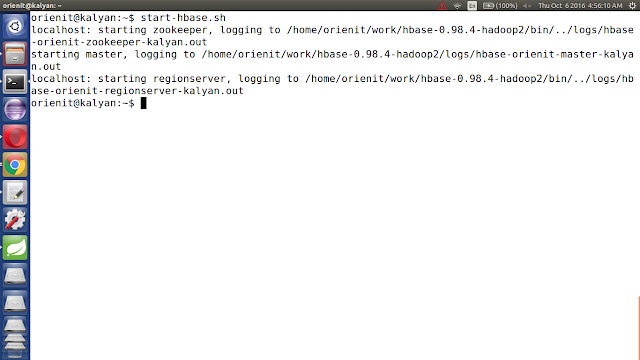
i. start the hbase using below 'start-hbase.sh' command.


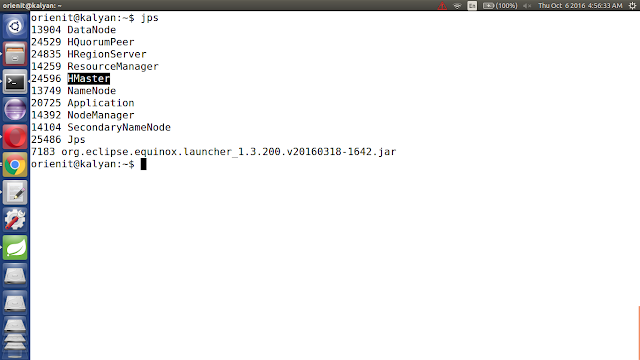
ii. verify the hbase is running or not with "jps" command


iii. Start the phoenix using below 'sqlline.py localhost' command.


iv. list out all the tables in phoenix using '!tables' command


8. Execute the below command to `Extract data from CSV data into Phoenix using Flume`

$FLUME_HOME/bin/flume-ng agent -n agent --conf $FLUME_HOME/conf -f $FLUME_HOME/conf/kalyan-regex-phoenix-agent.conf -Dflume.root.logger=DEBUG,console

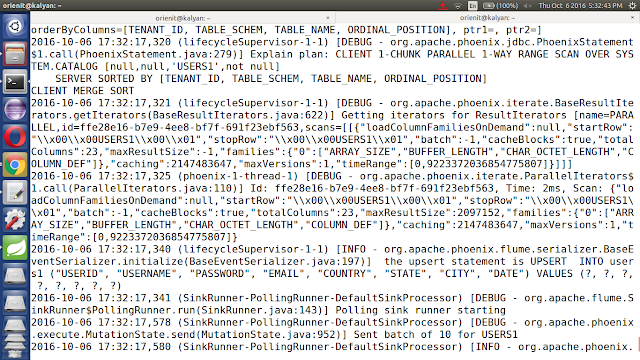
9. Verify the data in console

10. Verify the data in Phoenix

Execute below command to get the data from phoenix table 'users1'

!tables

select count(*) from users1;

select * from users1;


How To Stream Text Data Into HBase Using Apache Flume

Pre-Requisites of Flume Project:
hadoop-2.6.0
flume-1.6.0
hbase-0.98.4
java-1.7

Project Compatibility :
1. hadoop-2.6.0 + hbase-0.98.4 + flume-1.6.0
2. hadoop-2.7.2 + hbase-1.1.2 + flume-1.7.0

NOTE: Make sure that install all the above components


Flume Project Download Links:

`hadoop-2.6.0.tar.gz` ==> link
`apache-flume-1.6.0-bin.tar.gz` ==> link
`kalyan-text-hbase-agent.conf` ==> link
`kalyan-flume-project-0.1.jar` ==> link

-----------------------------------------------------------------------------

1. create "kalyan-text-hbase-agent.conf" file with below content

agent.sources = NETCAT
agent.channels = MemChannel
agent.sinks = HBASE

agent.sources.NETCAT.type = netcat
agent.sources.NETCAT.bind = localhost
agent.sources.NETCAT.port = 3000
agent.sources.NETCAT.channels = MemChannel

agent.sinks.HBASE.type = hbase
agent.sinks.HBASE.table = sample1
agent.sinks.HBASE.columnFamily = cf
agent.sinks.HBASE.serializer = org.apache.flume.sink.hbase.SimpleHbaseEventSerializer
agent.sinks.HBASE.serializer.payloadColumn=message
agent.sinks.HBASE.serializer.incrementColumn=inc
agent.sinks.HBASE.channel = MemChannel

agent.channels.MemChannel.type = memory
agent.channels.MemChannel.capacity = 1000
agent.channels.MemChannel.transactionCapacity = 100


2. Copy "kalyan-text-hbase-agent.conf" file into "$FUME_HOME/conf" folder


3. Copy "kalyan-flume-project-0.1.jar" file into "$FLUME_HOME/lib" folder


4. To work with Flume + HBase Integration

Follow the below steps

i. start the hbase using below 'start-hbase.sh' command.


ii. verify the hbase is running or not with "jps" command


iii. connect to hbase using 'hbase shell' command


iv. list out all the tables in hbase using 'list' command


v. create the hbase table name is 'sample1' with column family name is 'cf' using below command.


create 'sample1', 'cf'


vi. read the data from hbase table 'sample1' using below 
command.

scan 'sample1'


5. Execute the below command to `Extract data from Text data into HBase using Flume`

$FLUME_HOME/bin/flume-ng agent -n agent --conf $FLUME_HOME/conf -f $FLUME_HOME/conf/kalyan-text-hbase-agent.conf -Dflume.root.logger=DEBUG,console


6. Connect to Socket Server using below command

telnet localhost 3000


NOTE: send the sample text to flume like below screen


7. Verify the data in console


8. Verify the data in HBase

Execute below command to get the data from hbase table 'sample1'

count 'sample1'

scan 'sample1'


Wednesday, 5 October 2016

How To Stream JSON Data Into HBase Using Apache Flume

Pre-Requisites of Flume Project:
hadoop-2.6.0
flume-1.6.0
hbase-0.98.4
java-1.7

Project Compatibility :
1. hadoop-2.6.0 + hbase-0.98.4 + flume-1.6.0
2. hadoop-2.7.2 + hbase-1.1.2 + flume-1.7.0

NOTE: Make sure that install all the above components


Flume Project Download Links:

`hadoop-2.6.0.tar.gz` ==> link
`apache-flume-1.6.0-bin.tar.gz` ==> link
`kalyan-json-hbase-agent.conf` ==> link
`kalyan-flume-project-0.1.jar` ==> link
`bigdata-examples-0.0.1-SNAPSHOT-dependency-jars.jar` ==> link

-----------------------------------------------------------------------------

1. create "kalyan-json-hbase-agent.conf" file with below content

agent.sources = EXEC
agent.channels = MemChannel
agent.sinks = HBASE

agent.sources.EXEC.type = exec
agent.sources.EXEC.command = tail -F /tmp/users.json
agent.sources.EXEC.channels = MemChannel

agent.sinks.HBASE.type = hbase
agent.sinks.HBASE.table = users2
agent.sinks.HBASE.columnFamily = cf
agent.sinks.HBASE.serializer = com.orienit.kalyan.flume.sink.JsonHbaseEventSerializer
agent.sinks.HBASE.serializer.colNames=userid,username,password,email,country,state,city,dt
agent.sinks.HBASE.channel = MemChannel

agent.channels.MemChannel.type = memory
agent.channels.MemChannel.capacity = 1000
agent.channels.MemChannel.transactionCapacity = 100


2. Copy "kalyan-json-hbase-agent.conf" file into "$FUME_HOME/conf" folder


3. Copy "kalyan-flume-project-0.1.jar and bigdata-examples-0.0.1-SNAPSHOT-dependency-jars.jar" files into "$FLUME_HOME/lib" folder


4. Generate Large Amount of Sample JSON data follow this article.


5. Execute Below Command to Generate Sample JSON data with 100 lines. Increase this number to get more data ...

java -cp $FLUME_HOME/lib/bigdata-examples-0.0.1-SNAPSHOT-dependency-jars.jar \
com.orienit.kalyan.examples.GenerateUsers \
-f /tmp/users.json \
-n 100 \
-s 1


6. Verify the Sample JSON data in Console, using below command

cat /tmp/users.json


7. To work with Flume + HBase Integration

Follow the below steps


1. start the hbase using below 
command.

start-hbase.sh 


2. verify the hbase is running or not with "jps" command


3. connect to hbase using below command 

hbase shell


4. list out all the tables in hbase using 'list' command


5. create the hbase table name is 'users2' with column family name is 'cf' using below command.

create 'users2', 'cf'


6. read the data from hbase table 'users2' using below command.
scan 'users2'

8. Execute the below command to `Extract data from JSON data into HBase using Flume`

$FLUME_HOME/bin/flume-ng agent -n agent --conf $FLUME_HOME/conf -f $FLUME_HOME/conf/kalyan-json-hbase-agent.conf -Dflume.root.logger=DEBUG,console


9. Verify the data in console


10. Verify the data in HBase

Execute below command to get the data from hbase table 'users2'

count 'users2'

scan 'users2'


How To Stream CSV Data Into HBase Using Apache Flume

Pre-Requisites of Flume Project:
hadoop-2.6.0
flume-1.6.0
hbase-0.98.4
java-1.7

Project Compatibility :
1. hadoop-2.6.0 + hbase-0.98.4 + flume-1.6.0
2. hadoop-2.7.2 + hbase-1.1.2 + flume-1.7.0

NOTE: Make sure that install all the above components


Flume Project Download Links:

`hadoop-2.6.0.tar.gz` ==> link
`apache-flume-1.6.0-bin.tar.gz` ==> link
`kalyan-regex-hbase-agent.conf` ==> link
`kalyan-flume-project-0.1.jar` ==> link
`bigdata-examples-0.0.1-SNAPSHOT-dependency-jars.jar` ==> link

-----------------------------------------------------------------------------

1. create "kalyan-regex-hbase-agent.conf" file with below content

agent.sources = EXEC
agent.channels = MemChannel
agent.sinks = HBASE

agent.sources.EXEC.type = exec
agent.sources.EXEC.command = tail -F /tmp/users.csv
agent.sources.EXEC.channels = MemChannel

agent.sinks.HBASE.type = hbase
agent.sinks.HBASE.table = users1
agent.sinks.HBASE.columnFamily = cf
agent.sinks.HBASE.serializer = org.apache.flume.sink.hbase.RegexHbaseEventSerializer
agent.sinks.HBASE.serializer.regex = ^([^,]*),([^,]*),([^,]*),([^,]*),([^,]*),([^,]*),([^,]*),([^,]*)$
agent.sinks.HBASE.serializer.colNames=userid,username,password,email,country,state,city,dt
agent.sinks.HBASE.channel = MemChannel

agent.channels.MemChannel.type = memory
agent.channels.MemChannel.capacity = 1000
agent.channels.MemChannel.transactionCapacity = 100

2. Copy "kalyan-regex-hbase-agent.conf" file into "$FUME_HOME/conf" folder

3. Copy "kalyan-flume-project-0.1.jar and bigdata-examples-0.0.1-SNAPSHOT-dependency-jars.jar" files into"$FLUME_HOME/lib" folder

4. Generate Large Amount of Sample CSV data follow this article.

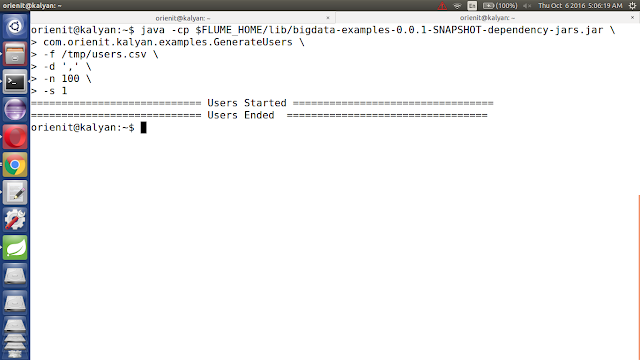
5. Execute Below Command to Generate Sample CSV data with 100 lines. Increase this number to get more data ...

java -cp $FLUME_HOME/lib/bigdata-examples-0.0.1-SNAPSHOT-dependency-jars.jar \
com.orienit.kalyan.examples.GenerateUsers \
-f /tmp/users.csv \
-d ',' \
-n 100 \
-s 1


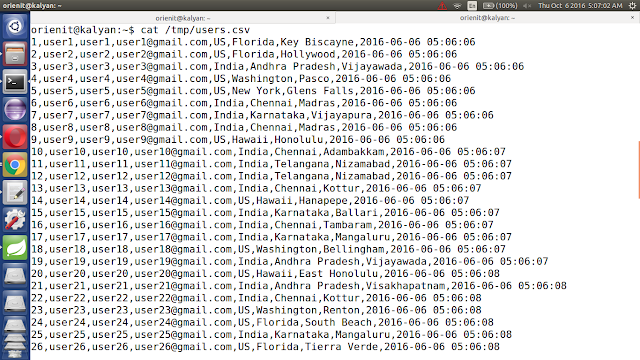
6. Verify the Sample CSV data in Console, using below command

cat /tmp/users.csv


7. To work with Flume + HBase Integration

Follow the below steps
1. start the hbase using below 'start-hbase.sh' command.


2. verify the hbase is running or not with "jps" command


3. connect to hbase using 'hbase shell' command


4. list out all the tables in hbase using 'list' command


5. create the hbase table name is 'users1' with column family name is 'cf' using below create 'users1', 'cf' command.


6. read the data from hbase table 'users1' using below scan 'users1' command.


8. Execute the below command to `Extract data from CSV data into HBase using Flume`

$FLUME_HOME/bin/flume-ng agent -n agent --conf $FLUME_HOME/conf -f $FLUME_HOME/conf/kalyan-regex-hbase-agent.conf -Dflume.root.logger=DEBUG,console


9. Verify the data in console


10. Verify the data in HBase

Execute below command to get the data from hbase table 'users1'

count 'users1'

scan 'users1'


How to generate large amount of sample data with simple techniques

Download the Required jar file from this link.


Generate Sample Users using Below Command

java -cp bigdata-examples-0.0.1-SNAPSHOT-dependency-jars.jar \
com.orienit.kalyan.examples.GenerateUsers

usage: help

-d,--delimiter Field Delimiter, bydefault is json format
-f,--file output file path
-h,--help Show this help and quit
-n,--numberOfUsers number of users
-s,--startNumber starting number of userid, bydefault is 1


Example1 : To Generate json data, use below command

java -cp bigdata-examples-0.0.1-SNAPSHOT-dependency-jars.jar \
com.orienit.kalyan.examples.GenerateUsers \
-f /tmp/users.json \
-n 10 \
-s 1


Example2 : To Generate csv data, use below command

java -cp bigdata-examples-0.0.1-SNAPSHOT-dependency-jars.jar \
com.orienit.kalyan.examples.GenerateUsers \
-f /tmp/users.csv \
-d ',' \
-n 10 \
-s 1


Example3 : To Generate tsv data, use below command

java -cp bigdata-examples-0.0.1-SNAPSHOT-dependency-jars.jar \
com.orienit.kalyan.examples.GenerateUsers \
-f /tmp/users.tsv \
-d '\t' \
-n 10 \
-s 1


Example4 : To Generate any delimiter data, use below command

java -cp bigdata-examples-0.0.1-SNAPSHOT-dependency-jars.jar \
com.orienit.kalyan.examples.GenerateUsers \
-f /tmp/users.txt \
-d '#' \
-n 10 \
-s 1


Generate Sample Product Log using Below Command

java -cp bigdata-examples-0.0.1-SNAPSHOT-dependency-jars.jar \
com.orienit.kalyan.examples.GenerateProductLog

usage: help

-d,--delimiter Field Delimiter, bydefault is json format
-f,--file output file path
-h,--help Show this help and quit
-l,--numberOfLogs number of logs
-n,--numberOfUsers number of users


Example1 : To Generate json data, use below command


java -cp bigdata-examples-0.0.1-SNAPSHOT-dependency-jars.jar \
com.orienit.kalyan.examples.GenerateProductLog \
-f /tmp/productlog.json \
-n 10 \
-l 20


Example2 : To Generate csv data, use below command

java -cp bigdata-examples-0.0.1-SNAPSHOT-dependency-jars.jar \
com.orienit.kalyan.examples.GenerateProductLog \
-f /tmp/productlog.csv \
-d ',' \
-n 10 \
-l 20


Example3 : To Generate tsv data, use below command

java -cp bigdata-examples-0.0.1-SNAPSHOT-dependency-jars.jar \
com.orienit.kalyan.examples.GenerateProductLog \
-f /tmp/productlog.tsv \
-d '\t' \
-n 10 \
-l 20


Example4 : To Generate any delimiter data, use below command

java -cp bigdata-examples-0.0.1-SNAPSHOT-dependency-jars.jar \
com.orienit.kalyan.examples.GenerateProductLog \
-f /tmp/productlog.txt \
-d '#' \
-n 10 \
-l 20


Related Posts Plugin for WordPress, Blogger...